Regular Table
As shown in the figure below, the spreadsheet is divided into four functional regions:
- Superheader (Gray)
- Field Headers (Blue)
- Config IDs (Orange)
- Config Data (Green)
Any spreadsheet using this specific four-region layout is a Regular Table.
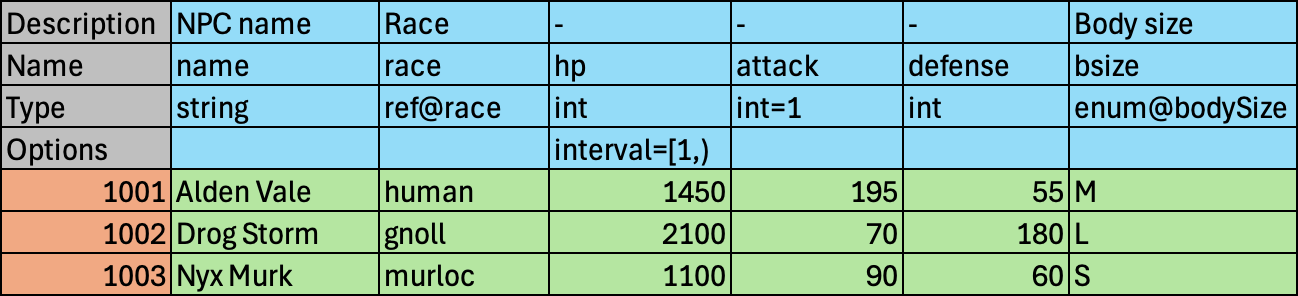
A regular table:
- Can be the target of a
ref, or the source of abackref/backref-n. - Can have
anchor,origin,backref, andbackref-nfields. - Can serve as a partition of a virtual table.
Superheader
Section titled “Superheader”Superheader (Gray) sits in the top-left corner and labels the Field Headers (Blue), functioning as their meta-header.
The figure above demonstrates only the core labels: Description, Name, Type, and Options. They define the schema for each field; additional labels are available for advanced usage.
| Label | Required | Description |
|---|---|---|
| Description | Yes | A human-readable description with no functional effect on data export or code generation. Use - when no description is needed. Can be abbreviated as Desc. |
| Name | Yes | The field’s identifier, used in exported data and generated code; changing it affects all downstream output. |
| Type | Yes | The field’s data type and its default export value, e.g., int=/, where / represents the type’s zero value. |
| Options | No | Associated options. Used to filter fields, define constraints, or configure output. Multiple Options rows are allowed. |
See Also
Section titled “See Also”Field Headers
Section titled “Field Headers”Field Headers (Blue) lie to the right of Superheader (Gray).
A data field occupies one or more columns. A field is valid only when its Description, Name, and Type are all present.
See Also
Section titled “See Also”Config IDs
Section titled “Config IDs”Config IDs (Orange) occupy the first column beneath Superheader (Gray).
- The data type of the config ID must be integer or string.
- Integer IDs must be greater than zero.
- Each ID must be unique.
See Also
Section titled “See Also”Config Data
Section titled “Config Data”Config Data (Green) fills the rest of the spreadsheet.
This region holds the actual config entries. Cells in this region must conform to the Type and Options defined in the Field Headers.