Unity Editor
Archmage can display config ID fields in the Inspector as dropdowns. Without dropdowns, you must look up each ID in a config table and enter it manually. A mistyped ID can go unnoticed until the game runs. With a dropdown, you select the ID from a searchable list of the table’s IDs, and the list can show a name next to each ID.
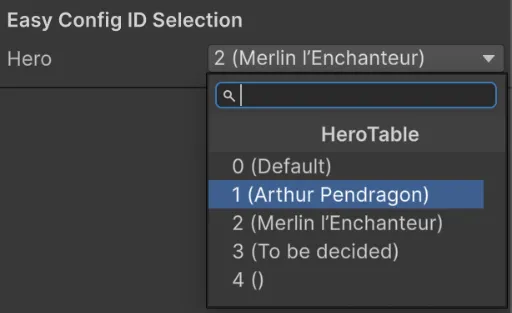
archmage struct generates the dropdown code with the unity-editor template. The generated code has two parts: ArchmageEditorTools, which loads the configs in the Unity Editor, and a property drawer for each config ID type.
Generate the Code
Section titled “Generate the Code”Run archmage struct with the same arguments as for the config code, but with a different -t, --namespace and -o:
archmage struct -t unity-editor --namespace Conf.Editor \ -o Assets/Editor hero.xlsx race.xlsx--namespacemust be the namespace of the config code or a namespace inside it, because the generated code uses the config types without anyusingdirectives.-omust be either anEditorfolder or a subfolder inside it.
Run the command each time you generate the config code.
Load the Configs
Section titled “Load the Configs”In the Initialize method of ArchmageEditorTools.cs, replace the TODO comment and the TODO log with code that loads the configs synchronously and sets ConfigAtlas.Instance:
// Replace "Assets/Configs" with your actual config directory.const string cfgRoot = "Assets/Configs";var atlas = new ConfigAtlas();var options = new AtlasOptions() .WithLogger(new UnityAtlasLogger()) .WithJsonSettings(UnityJsonSettingsFactory.Create());Archmage.LoadAtlas($"{cfgRoot}/atlas.json", cfgRoot, atlas, options);ConfigAtlas.Instance = atlas;The configs are loaded when the Unity Editor starts and are reloaded after each script compilation. To load changed config files manually, choose Tools > Reload Game Configs for Editor. In Play Mode, once the game sets ConfigAtlas.Instance, the dropdowns show the IDs of the configs that the game loads.
Define Config ID Fields
Section titled “Define Config ID Fields”A field of a config ID type, such as HeroCfgId, shows as a dropdown. In an array or a list of a config ID type, each element also shows as a dropdown:
public HeroCfgId Hero;public RaceCfgId Race;public HeroCfgId[] Heroes;public List<RaceCfgId> Races;Show More Than Just the ID
Section titled “Show More Than Just the ID”By default, each dropdown shows only the IDs. To show more, initialize the ID’s drawer with a display formatter in InitializeCfgIdDrawers, after RegisterDefaultCfgIdDrawers:
HeroCfgIdDrawer.Initialize(atlas.HeroTable, v => $"{v} ({new HeroCfgId(v).Cfg.Name.Text})");If the formatter reads localized text, such as Cfg.Name.Text, the load code must also set L10n.GetI18n and L10n.GetPreferredLanguage.